
Transform your JetBrains IDE into a real-time audio development environment. Write Faust DSP code and immediately hear and visualize the results—no external tools, no context switching.
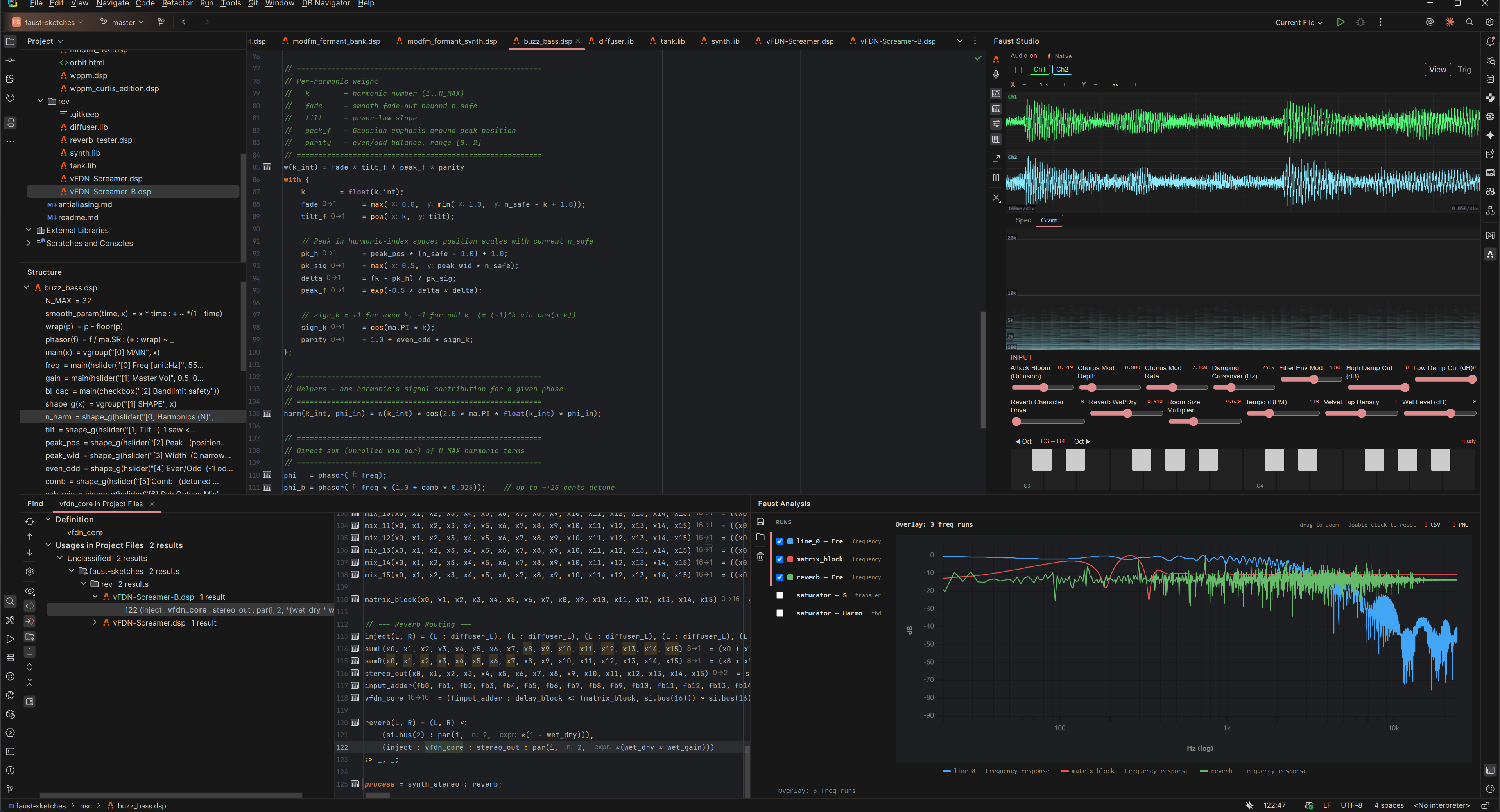
The Immediate Feedback Loop
Traditional DSP development is full of friction: write code, run an external compiler, launch a testing tool, analyze the output, repeat. Faust Studio removes the barrier between writing code and analyzing the signal.
As you type, the plugin understands your architecture. When the file autosaves, the DSP is instantly compiled to WebAssembly and routed to your speakers. The IDE is no longer just a text editor; it is a live, interactive testbench for signal processing.
Core Capabilities
Language intelligence combined with high-performance audio routing. Everything you need to prototype, test, and verify DSP algorithms in one window.
Seamless Exporting
The plugin is an ideal prototyping environment, but Faust is also designed for deployment. When your algorithm is ready, use the built-in export panel to compile your DSP to C++, Rust, WebAssembly, JAX, and over a dozen other targets.
See the full list of export targets
- C++
- C
- C++ (old)
- JUCE plugin (C++)
- JUCE standalone (C++)
- C#
- Rust
- D
- Java
- Julia
- JAX (Python)
- JSFX
- Cmajor
- Codebox (RNBO)
- LLVM IR
- Interpreter bytecode
- FIR
- WebAssembly
- WebAssembly text (WAST)
- VHDL
- SDF3
- ASC
Note: exporting requires a standard local Faust installation to be configured in the plugin settings. When configured, the same installation is also used automatically for live preview compilation.
Motivation
I built this tool to solve my own workflow frustrations. Visual audio environments like Max or Pure Data can quickly turn into spaghetti code, while most text-based languages feel uninspiring for instrument design. Faust is a beautiful, immediate language with a functional paradigm perfectly suited for audio, but its standard web IDE didn't fit my workflow.
I needed a way to write or generate Faust code and test it immediately in my primary IDE. Because this plugin was built to answer my specific needs, it may lack features that are essential to your workflow. If so, please do not hesitate to contact me.
Who is Faust Studio For?
- Instrument and plugin designers (me): Sketch synths and effects with immediate feedback, then export to C++ or Rust when the design is ready.
- DSP researchers: Measure frequency, impulse, and THD responses in the offline analysis bench, visually verify signal behavior, and export plots or waveform data for further analysis.
- Computer music students: Learn functional signal processing with immediate, accessible feedback.
REQUIREMENTS
- IDEAny JetBrains IDE 2023.3+ (IntelliJ, CLion, Rider, WebStorm, etc.)
- OSWindows, macOS, Linux
- Local SetupNone required for live preview (WASM bundled)
- Native Compile PathOptional — auto-detected when Faust is installed; useful for very large or complex DSPs
- Export TargetsRequires local Faust installation